


























Ultimate FRP Bypass Guide: Remove the FRP Lock from Any Android OS Device Easily
FRP unlock

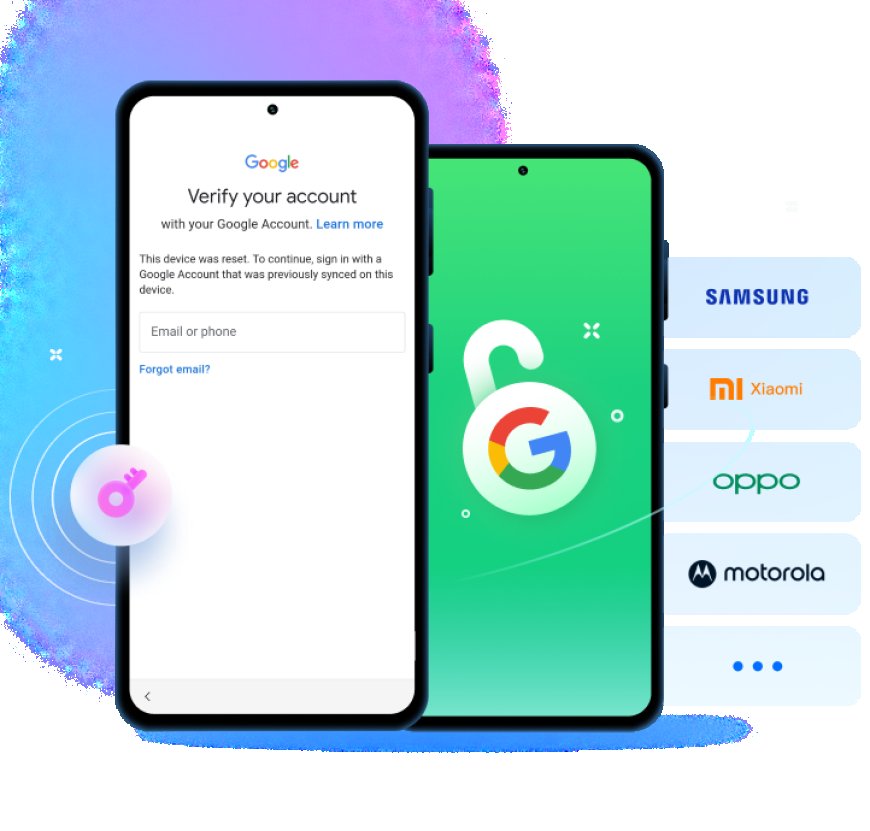
Stuck with a locked Android phone or tablet after a Hard Reset? You’re not alone. In this comprehensive FRP unlock guide, we’ll show you how to remove the Google FRP lock before Factory Reset or after, and regain full access to your Android phone or tablet, including Google Pixel, Samsung Galaxy, Vivo, Xiaomi, and more. Whether you’re a technician, reseller, or just a frustrated user trying to get past the lock screen, this article has the answers.
Why this article is worth your time:
FRP is a crucial security feature designed to protect Android devices from unauthorized access. However, when you forget your Google account credentials or buy a second-hand phone that’s still locked, FRP can become an obstacle. This article offers a practical step-by-step approach to FRP bypass, helping you remove the Google account, unlock Android, and safely regain control of your phone.
In This Guide for FRP Lock Bypass, You Will Find:
1. What is FRP, and Why Does It Exist?
Factory Reset Protection (FRP) is a built-in security measure introduced by Google with Android 5.1. It protects users from data theft by preventing unauthorized access after a Factory Reset. If your device is reset without your permission, the Google FRP kicks in, asking for the last synced Google account before you can use the device again.
The FRP ensures that even if someone steals your phone, they won’t be able to wipe and use it without knowing the Google account and password previously registered on the device. However, this also means legitimate users can be locked out if they forget their credentials.
2. When Does the FRP Activate on Android Devices?
The FRP activates immediately after a Factory Reset on devices running Android 5.1 or later, including Samsung and OnePlus phones, Motorola and Realme devices, Vivo and Oppo gadgets, or Xiaomi and Redmi, etc. If your phone had a Google account logged in before the reset, it will ask for that account’s credentials during setup.
This lock typically appears in the following scenarios:
- You’ve performed a Factory Reset but don’t remember your Google password and login.
- You’ve purchased a locked phone from someone who forgot to remove Google account.
- The Lock Screen password was forgotten, and you can't remove account of Google before Hard Reset.
- You've got the Android tablet or phone as a gift and need to bypass Google Account Verification.
FRP on Android is automatic and cannot be manually disabled unless you first remove the Google account through Settings.
3. Is It Legal to Bypass FRP Lock? Understanding the Legal Boundaries
Bypassing FRP can exist in a legal gray area. If you are the legitimate owner of the device and just forgot your Google password, bypassing is generally accepted. However, removing Google or unlocking a Samsung FRP lock on stolen devices is illegal.
Make sure you:
- Own the device or have the owner’s permission.
- Are not violating any terms of service or laws in your country.
- Use the bypass method only for educational or recovery purposes.
- The purchased FRP locked phone is of legal origin.
FRP lock removal procedure should never be used for malicious intent.
4. How to Prepare Your Android for an FRP Bypass?
Before attempting any bypass, it's essential to understand the requirements and risks. If your phone is stuck on the lock screen, and you don’t have the password or Google credentials, here's what you need to do:
- Charge your device to at least 60%.
- Enable USB debugging if you can access the phone.
- Determine your Android version and brand (Samsung, Xiaomi, etc.).
- Download a compatible removal tool or similar FRP tool.
- Get a reliable PC if the method to bypass FRP you choose requires software like UnlockGo Android.
Being prepared is the first step to successfully bypass the Google FRP lock without bricking your phone.
5. Top FRP Bypass Tools in 2025: Which One Works Best?
There are many tools available to bypass FRP on Android devices. Some are free, while others are premium. Here are some popular options:
- UnlockGo for Android - an all-in-one Android Unlocker known to disable Factory Reset Protection without Google Account details. Supports a wide range of Samsung phones and other brands.
- FRP Bypass APK - a small app that helps you open Settings and remove the account directly. You can use it via OTG or PC.
- Odin Tool (for Samsung) - app that used in Download Mode to flash firmware or a custom recovery that can remove the FRP.
Always choose an option to delete FRP based on your device brand and Android OS version.
6. Can You Bypass Google Lock Without a PC or Software?
Yes! In many cases, you can bypass FRP lock without a computer using just your phone. These tricks often involve:
- Exploiting bugs in the Android setup wizard.
- Using Emergency dialer codes.
- Accessing browser links via Bluetooth.
- Download and install Android Lock removal app from an OTG drive.
While easy to bypass in some cases, newer Android versions are more secure. So this method might not always work on devices running Android 12 or above.
7. Ways to Bypass the FRP Lock
Each brand has different techniques to bypass FRP. Here are examples of how to handle some of the top ones:
Oppo & Vivo
Use a deleting tool or APK file to launch settings via Wi-Fi setup tricks.
Some models allow backdoor access through the emergency dialer or text input fields during setup.
Xiaomi & Redmi
With Xiaomi (and Redmi) phones, you may need a Mi account unlock in addition to FRP unlock.
You can use tools like Mi Account Remover or rely on ADB commands if USB debugging is enabled.
These methods help you unlock Android and remove FRP even when standard options are blocked.
Samsung
Samsung phones are among the most frequently locked devices due to FRP. Here's how to bypass FRP on Samsung.
- Method 1: Using a SIM and Notification Trick
Insert a SIM card with a pin lock. When the lock screen appears, trigger a call to the device. This often lets you access settings or browser, where you can install the FRP bypass APK and remove the Google FR Protection on Samsung. - Method 2: Using a Software
Flash a custom ROM or combination file using Odin in Download Mode. This can disable the FRP or allow you to access the device and bypassing Google FRP lock on Samsung manually.
These methods are effective to bypass Samsung devices, including Galaxy A series, S series, and M series models.
What's Your Reaction?
 Like
0
Like
0
 Dislike
0
Dislike
0
 Love
0
Love
0
 Funny
0
Funny
0
 Angry
0
Angry
0
 Sad
0
Sad
0
 Wow
0
Wow
0